Warning
Nous commençons tout juste à traduire la documentation pour cette langue, désolé !
Nous affichons des pages traduites partiellement afin de suivre l’avancement.
Cette page n’est pas encore traduite. Mais la bonne nouvelle est que vous pouvez rejoindre la communauté de traduction pour nous aider 👋.
OAuth apps#
OAuth apps let an external tool, AI agent, or partner application act on a Grist user’s data on their behalf, with permissions and document scope the user controls.
This page is reference material for building such tools or registering existing OAuth-enabled tools with Grist.
Grist’s OAuth server supports standard OAuth 2.0 authorization code flow with PKCE. For the protocol itself, see oauth.net and RFC 6749.
For the end-user view of the same feature, see Connected apps, which covers what users see when they authorize an app, and how they can manage their authorized apps.
Availability
For self-hosted installations, OAuth apps are part of the full Grist edition. The OAuth server runs on your infrastructure, with token issuance, authorization, and validation all happening on systems you control.
When OAuth fits better than an API key#
A Grist API key carries a user’s full account access. It is simpler for scripts and integrations you run yourself. Prefer OAuth when:
- You are building tools or integrations for someone else to use. Each user connects it under their own permissions and attribution. This is more secure and more convenient for the user than asking users to paste their own API keys.
- You are connecting an OAuth-enabled system to act as each user. Third-party systems that support OAuth can be connected to Grist to allow each user to authorize and act with their own permissions. This is more secure than using an API key for a special “master” account with wide access.
Discovery#
For getgrist.com
GET https://login.getgrist.com/.well-known/oauth-authorization-server
For your self-hosted server
GET https://<your-grist-server>/.well-known/oauth-authorization-server
This returns a standard JSON discovery document, which lists the authorization, token, and revocation endpoints, plus supported scopes, grant types, and PKCE methods. Most OAuth client libraries support using such a discovery endpoint instead of hardcoding paths.
Register an app#
For an app that connects to getgrist.com, visit your Account settings → Developer page. For self-hosted installations, you can find ‘Account settings’ under your user menu. The ‘OAuth apps’ section lists the OAuth apps you are a maintainer for, and lets you register new ones.
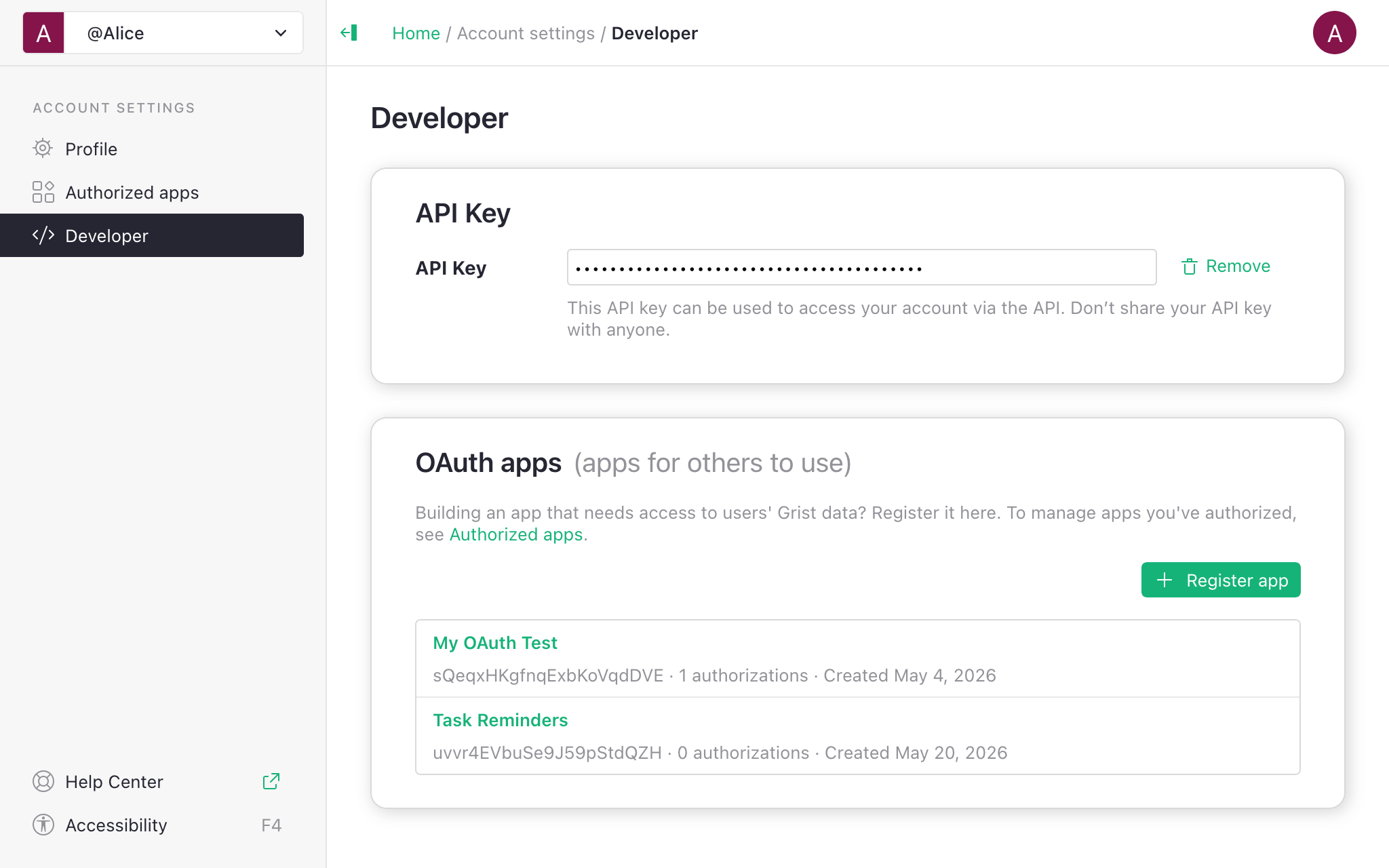
Click “Register app” and fill in:
- Application name — shown on the consent screen.
- Redirect URI — where users return after authorizing. Must use
https://protocol, buthttp://is allowed for thelocalhostdomain. - Scopes – what permissions your app is allowed to request. This lets you apply the principle of least privilege and limit what the app can do even if it’s compromised.
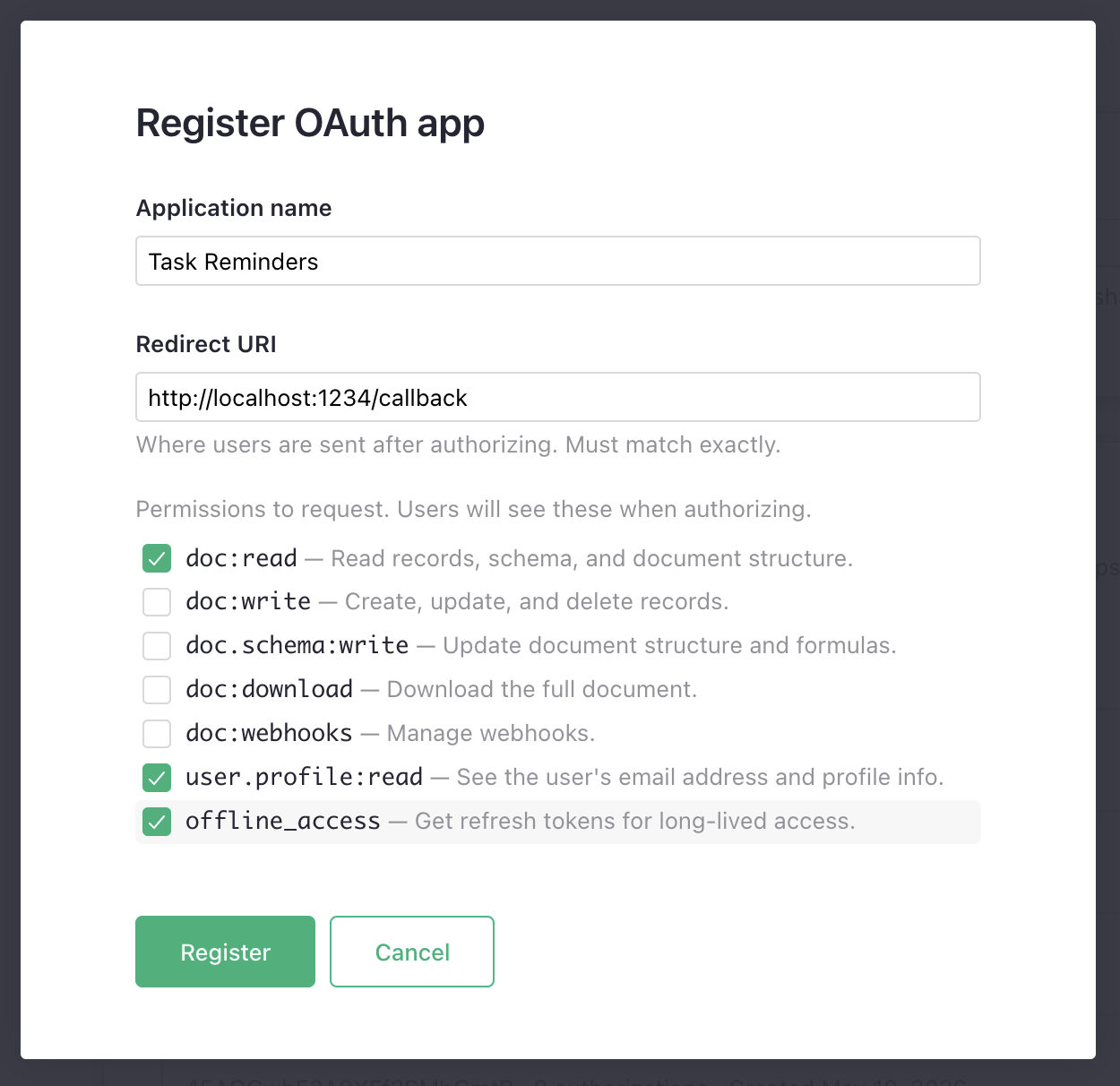
These are the minimum properties needed to register an app. After registering, copy the client ID and client secret. The secret is shown once.
After this first step, you are taken to the app’s settings page, where you can configure other properties of the app:
- Application URI – the app URL shown to users. It defaults to the origin of the ‘Redirect URI’.
- Redirect URIs – you may set additional redirect URIs, entering one per line. When your app starts the flow, the redirect URI must match one of these exactly.
- Contact email and Description – informational fields to explain to users what app they are authorizing and how to get support for it.
- Scopes – you can change the scopes you originally set. You may enable all scopes, or any subset, but you must include at least one.
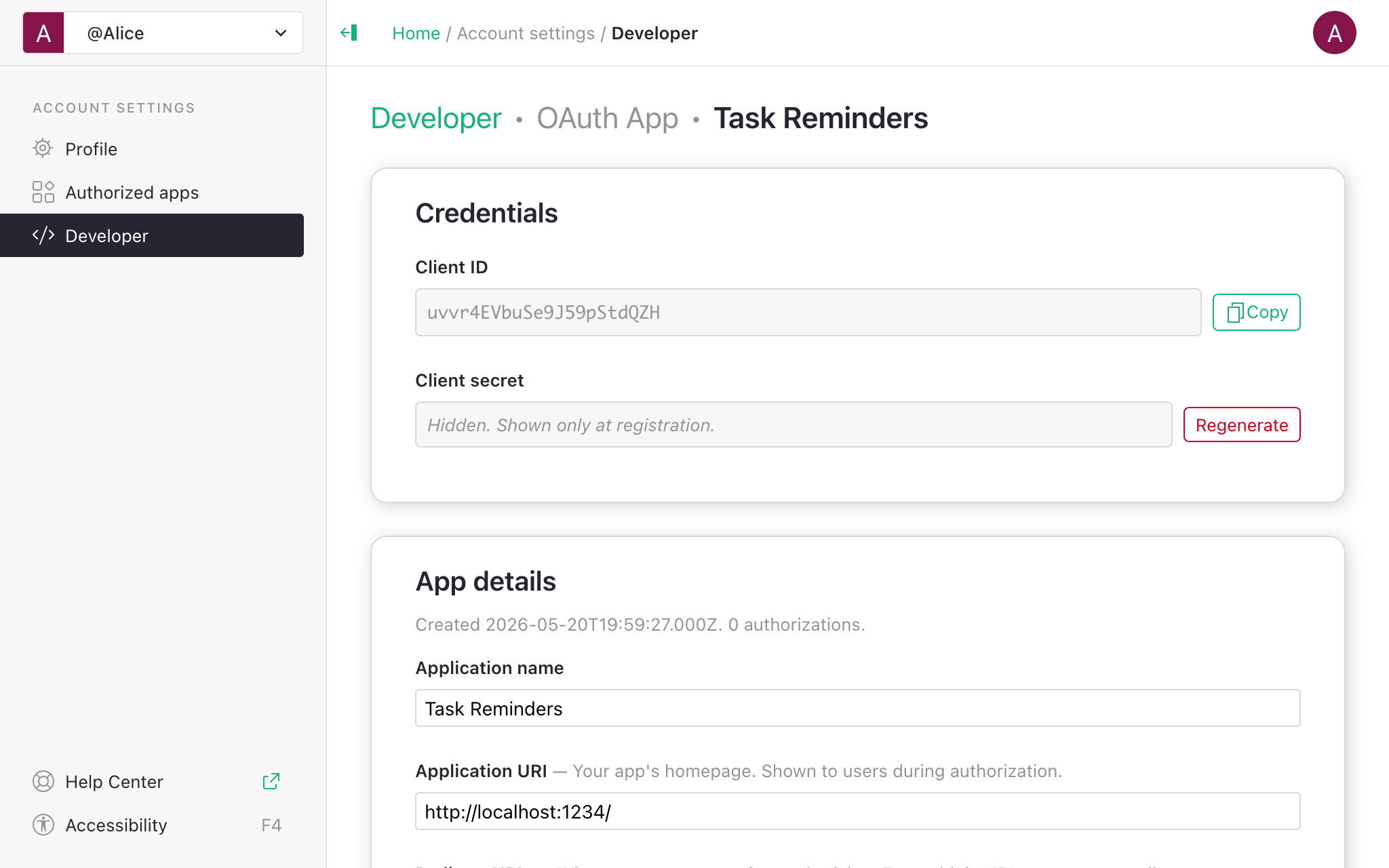
If you make changes, don’t forget to save using the ‘Save changes’ button at the bottom.
Scopes#
| Scope | Grants |
|---|---|
doc:read |
Read records, schema, and document structure. |
doc:write |
Create, update, and delete records. |
doc.schema:write |
Update document structure and formulas. |
doc:download |
Download the full document. |
doc:webhooks |
Manage webhooks. |
user.profile:read |
See the user’s name, email address, and profile info. |
offline_access |
Issue a refresh token. Requires prompt=consent on the authorization request. |
Access rules still apply in all cases: an authorized app sees and changes only what the authorizing user can see and change. Scopes allow limiting that further.
Note that doc.schema:write permission is equivalent to the “structure” (S) permission in access
rules, which is very powerful. Because this permission enables formula editing,
it allows its holder to obtain any data in the document, regardless of other access rules.
One of the security advantages of OAuth apps
is that you can limit them to data changes only, even if the authorizing user has the permission to
change structure.
Endpoints for OAuth tokens#
The scopes above give access to the following endpoints, curated for what’s typically needed by integrations. Endpoints not listed are not available to use with OAuth tokens.
For details of individual endpoints, see REST API Reference.
| Path | Scopes to read | Scopes to update |
|---|---|---|
/api/docs/{docId}/tables |
doc:read |
doc.schema:write |
/api/docs/{docId}/tables/{tableId}/columns* |
doc:read |
doc.schema:write |
/api/docs/{docId}/tables/{tableId}/records* |
doc:read |
doc:write |
/api/docs/{docId}/attachments* |
doc:read |
doc:write |
/api/docs/{docId}/download/* (csv, xlsx, …) |
doc:read |
— |
/api/docs/{docId}/download |
doc:download |
— |
/api/docs/{docId}/webhooks* |
doc:webhooks |
doc:webhooks |
/api/orgs |
doc* |
— |
/api/orgs/{orgId}/workspaces |
doc* |
— |
/api/workspaces/{wsId}/docs |
— | doc:write + doc.schema:write |
/api/profile/user |
user.profile:read |
— |
Any document or “doc”-level scope is enough to list organizations (“orgs” – personal and team sites) and to list the contents of the organization (workspaces and documents). If the user granted access to a limited set of resources, the app will only see those.
Note that the endpoints for exporting in tabular format (CSV, XLSX, etc.) respect access rules and
only require doc:read scope. The endpoint to download the full .grist document file allows a
document owner to bypass access rules, and so requires a separate scope. It may be useful for
automating offsite backups.
Managing the app#
Grist only supports “confidential clients”, i.e. those that use a client secret. The secret is only shown once when the app is registered. If you forgot to copy it, or need the secret again later, you always have the option to regenerate the secret from the app configuration page.
Regenerating the secret will break existing integrations that still use the old secret, including any background tasks relying on refresh tokens.
If the app is no longer used, you may use the ‘Delete app’ button to delete it.
Resource selections#
When the user authorizes your app, they may choose ‘All documents’ or pick
specific documents, workspaces, or orgs. The selection is enforced
on every API call: a request for a document outside the grant returns
403, even if the user themselves can access that document. Your app
does not need to do anything to support this.
If your app needs a document the user didn’t grant, the user can adjust the selection from their ‘Authorized apps’ page (see Connected apps), or you can prompt them to re-authorize.
Tokens#
| Access token | Refresh token | |
|---|---|---|
| Prefix | grist_at_ |
grist_rt_ |
| Format | Opaque | Opaque |
| Default TTL | 1 hour | 60 days |
| Rotation | – | Rotated when used past a fraction of its lifetime. If the refresh response includes a new refresh_token, replace your stored refresh token with it. |
The underlying grant persists until the user revokes it. A job that refreshes at least once every 30 days keeps working indefinitely.
Revoke a token per RFC 7009:
POST /oidc/revocation accepts either an access or refresh token. Users can also revoke from
their ‘Authorized apps’ page; doing so invalidates every token issued under that grant.
Grist-specific constraints#
- PKCE is required for every client, S256 recommended.
- Confidential clients only. Every registered app has a client
secret;
token_endpoint_auth_method=noneis not supported. Keep the secret on a server, not in a browser or mobile app. offline_accessrequiresprompt=consenton the authorization request. Without it the request fails withinvalid_request: offline_access scope requires prompt=consent.- Resource indicators (RFC 8707) are not used. Per-document selection happens on the consent screen and is enforced server-side; clients request scopes only.
- Not all REST endpoints accept OAuth tokens. The list of supported scopes and endpoints is curated for what’s typically needed by integrations.
Flow example#
A minimal end-to-end flow, using curl:
# Fill these in (from the app's settings page):
SERVER=https://login.getgrist.com  # Or your self-hosted Grist server
CLIENT_ID=...
CLIENT_SECRET=...
REDIRECT_URI=http://localhost:8000/oauth2/callback

# 1. Send the user to the authorization URL.
STATE=...  # Random CSRF token
PKCE_VERIFIER=...  # PKCE verifier value
PKCE_CHALLENGE=...  # PKCE challenge value

echo "$SERVER/oidc/auth?response_type=code&client_id=$CLIENT_ID\
&redirect_uri=$REDIRECT_URI&scope=doc:read+offline_access&state=$STATE\
&code_challenge=$PKCE_CHALLENGE&code_challenge_method=S256&prompt=consent"

# 2. The user returns to $REDIRECT_URI?code=...&state=...
#    Verify state matches, then exchange the received code for a token:
CODE=...  # code parameter from the URL

curl -u "$CLIENT_ID:$CLIENT_SECRET" "$SERVER/oidc/token" \
  -d grant_type=authorization_code \
  -d code="$CODE" \
  -d redirect_uri="$REDIRECT_URI" \
  -d code_verifier="$PKCE_VERIFIER"
# This request returns
# { access_token, refresh_token, expires_in, token_type: "Bearer", scope }

# 3. Call the API the same way as with an API key:
ACCESS_TOKEN=grist_at_...
DOC_ID=...
TABLE_ID=...

curl -H "Authorization: Bearer $ACCESS_TOKEN" \
  "$SERVER/api/docs/$DOC_ID/tables/$TABLE_ID/records"

# 4. Refresh later:
REFRESH_TOKEN=grist_rt_...
curl -u "$CLIENT_ID:$CLIENT_SECRET" "$SERVER/oidc/token" \
  -d grant_type=refresh_token -d refresh_token="$REFRESH_TOKEN"
Errors follow the OAuth 2.0 format: an HTTP 4xx with a JSON body containing error and
error_description properties.
Related#
- Connected apps — end-user view of the same feature.
- REST API usage — calling Grist with an access token uses the same endpoints as an API key. See Endpoints for OAuth tokens.
- API reference — full list of endpoints.